
How to Program and Pair New Rolling Code Remotes with a Gate's Receiver Unit
Rolling code remotes are widely used for secure access control, such as operating gates and garage doors. Programming and pairing a new rolling code remote with your gate's receiver unit might seem complex, but it is a straightforward process if you follow the correct steps. This guide will help you program and pair your remote, using the insights available from the Hiland website.
What is a Rolling Code Remote?
Rolling code remotes enhance security by using a dynamic code that changes each time the device is activated. This prevents replay attacks since the transmitted code is only valid once. To use a new remote, it has to be programmed with your gate's receiver unit to ensure communication.
Steps to Program and Pair Your New Remote
Step 1: Prepare Your Remote and Receiver Unit
Identify the receiver unit for your gate system. Usually, the receiver unit is installed near the gate motor. Refer to your receiver's manual (if available) to locate it and access the programming button. Ensure you have your new remote ready as well.
Step 2: Enter Programming Mode
Locate the "Learn" or "Programming" button on your receiver. Press and hold this button until the receiver indicator light starts blinking, signaling that it has entered programming mode. Each receiver model may behave slightly differently, so consult your owner's manual if needed.
Step 3: Program the Remote
Now, press and hold the main button on your new rolling code remote. Hold this button until the receiver's indicator light stops blinking or blinks rapidly. This indicates the receiver has successfully learned the rolling code of your new remote.
Step 4: Exit Programming Mode
After programming the remote, press the "Learn" or "Programming" button again (or wait for the timeout period). The indicator light should stop blinking, meaning the receiver has exited programming mode.
Step 5: Test the New Remote
Press the remote’s button to test it with the gate. If the gate operates successfully, the pairing was completed correctly. If it doesn’t work, repeat the steps carefully to ensure no errors occurred during programming.
Troubleshooting Tips
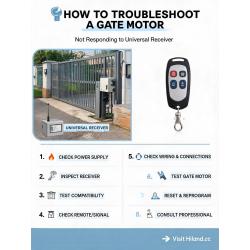
- Ensure your new remote is compatible with the receiver. Check the frequency and rolling code standards mentioned in your receiver’s manual.
- If the remote fails to program, reset the receiver and try again.
- Replace the remote's battery if it does not seem to transmit a signal.
- Consult the troubleshooting guides provided on the Hiland website for additional support.
Conclusion
Programming and pairing a new rolling code remote with your gate’s receiver is a manageable process with a bit of patience. Always refer to your specific receiver and remote's manuals or visit Hiland for product-specific guides and support. By following these steps, you’ll ensure a secure and functional gate operation with your new remote.





Leave A Comment